
I cannot consolidate my QCD board in the first week of 2026

Issue Symptoms

In a weekly frequency board, I can't launch the consolidation on the first week of 2026.

The calendar used to select the period displays dates at the end of 2026 and beginning of 2027, making it impossible to select the first week of 2026.


Solution

To get around this problem, you can use the following URL, replacing the variables with those corresponding to your case:

  1. In a text editor modify this request:
    {SERVER_URL}/s/servlet/qcd/api/consolidation/launch?type=boards&ids={BOARD_ID}&startDate=29-12-2025&endDate=04-01-2026

    by replacing the {SERVER_URL} variable by the URL of your iObeya instance and {BOARD_ID} variable by the ID of your board 

  2. Open a new browser tab
  3. Copy/Paste the URL you created in step 1 and launch this URL.

The consolidation of your board should work properly.


Support

If you require assistance to resolve the problem, please ask for support. (See Requesting Support)
QCD

I cannot consolidate my QCD board in the first week of 2026

Issue Symptoms


You are experiencing an issue when you change the month on a QCD Board, not all indicators update to reflect the previous month. You've tried changing the months and reconfiguring the table, but unfortunately the problem persists.


Cause


The problem you are experiencing is related to the creation of the period in advance.

Once a period has been created (i.e. accessed via the “Change period” menu), its configuration is instantiated from the configuration of the period you're in, and will no longer be modified if you make changes to the initial period.


In the case of a period that has not yet been instantiated, the configuration of the current period will be the same for the new period.

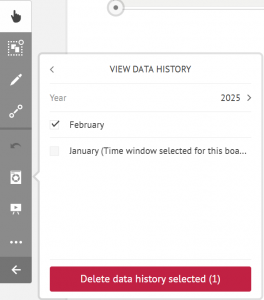
Existing periods are visible in the QCD utility > “View data history”. This behavior is also indicated in the period change window (QCD Utility > Month change).

 
Solution
 
 
A workaround is available in versions 4.20 and higher.
  • (Optional) Export the board to roll back just in case of an error.
  • Return to a previous period (containing the desired configuration of indicators)
  • Select the period which has the wrong indicator configuration from the QCD utility > View data history > Manage data history
  • Delete by clicking on "Delete data history selected"
  • Instantiate the month period, which should now have the correct configuration
If you're not at version 4.20 for this workaround or on a supported version, we recommend that you upgrade iObeya to a supported version in order to benefit from it as well as the new features and latest bug fixes.

Support


If you require assistance to resolve the problem, please ask for support. (See Requesting Support)
ApplicationQCD

I cannot consolidate my QCD board in the first week of 2026

Issue Symptoms

In a weekly frequency board, I can't launch the consolidation on the first week of 2025.

The calendar used to select the period displays dates at the end of 2025 and beginning of 2026, making it impossible to select the first week of 2025.


Solution

To get around this problem, you can use the following URL, replacing the variables with those corresponding to your case:

  1. In a text editor modify this request:
    {SERVER_URL}/s/servlet/qcd/api/consolidation/launch?type=boards&ids={BOARD_ID}&startDate=30-12-2024&endDate=05-01-2025
    by replacing the {SERVER_URL} variable by the URL of your iObeya instance and {BOARD_ID} variable by the ID of your board 
  2. Open a new browser tab
  3. Copy/Paste the URL you created in step 1 and launch this URL.

The consolidation of your board should work properly.


Support

If you require assistance to resolve the problem, please ask for support. (See Requesting Support)

QCD

I cannot consolidate my QCD board in the first week of 2026

Issue Symptoms


When trying to access a QCD board, the board gets stuck on a grey screen and indicates that the consolidation is in progress.

After a few minutes, the board is still blocked and the consolidation does not seem to be successful.

It is then no longer possible to access the contents of the board.


Solution

If you are in a version of QCD < 4.17.2 please contact the support team (support@iobeya.com) with your iObeya version number.

If you are in a version of QCD > 4.17.2 you can use the following procedure:

  1. Access the blocked QCD board
  2. Go to the URL field of your browser where the URL of your board is located.
    This URL is of the form :
    SERVER_URL/s/download/resources/client-html-plugin/version/public/#/fr/board/BOARD_ID
  3. Replace the following section of the URL :
    /s/download/resources/client-html-plugin/version/public/#/fr/board/
    by
    /s/servlet/qcd/qcdaddon/consolidation/?method=reset&boardId=
    Your URL will then be:
    SERVER_URL/s/servlet/qcd/qcdaddon/consolidation/?method=reset&boardId=BOARD_ID
  4. Launch the URL

The consolidation in your board should unblock and you can restart it.


Support
Please contact the support team if you have any questions about this procedure by sending an email to support@iobeya.com.

ApplicationQCD