Resolving SSO Error: "The end instant must be greater or equal to the start"

Problem:

SSO (Single Sign-On) fails on iObeya. IdP logs show successful connections. SAML Tracer traces appear to be correct. However, iObeya continues to encounter the following error message: Caused by: java.lang.IllegalArgumentException: The end instant must be greater or equal to the start.


Solution:

To resolve this issue, you need to ensure that the value of the "Maximum authentication age" parameter is less than Integer.MAX_VALUE: 2147483647.


For further details:

The source of this error message "The end instant must be greater or equal to the start" is related to the SAML parameter "Maximum authentication age" reaching the value of Integer.MAX_VALUE (an excessively high value that causes time calculation failures).

The issue lies within the SAMLUtil class of the spring-security-saml2-core dependency. In this method, the value of "Maximum authentication age" is passed in the forwardInterval parameter as a long type. Then, it is converted to int, and the predefined variable skewInSec=60 is added to call the DateTime#minusSeconds method. Consequently, if the sum of forwardInterval and skewInSec exceeds the integer limit, the result will be closer to Integer.MIN_VALUE (a value less than 0), potentially converting the subtraction into an addition of seconds.


If you encounter further issues or require additional assistance, please do not hesitate to contact our support team.
AdministrationApplication

Resolving SSO Error: "The end instant must be greater or equal to the start"

When installing a new iObeya server, you will be asked for a license after starting the application. 

In order for the iObeya support team to generate a license for your server, you will need to send us a unique identifier called "ServerID". 

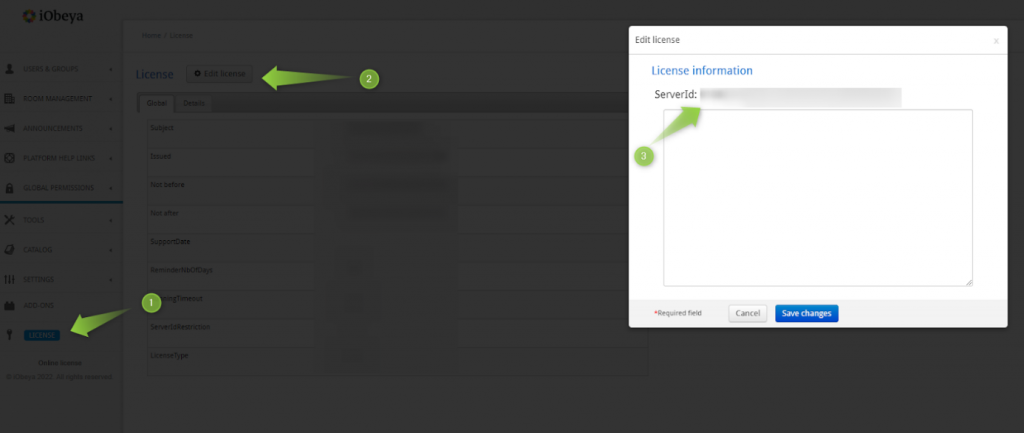
To find this identifier, you will need to log in to the administration interface. Then go to “License” menu and click on “Edit license”. A popup window will appears in which the serverID will be displayed

You will need to send this identifier to support via the address support@iobeya.com. 

Please note that it is strongly recommended to copy and paste this identifier rather than take a screenshot to avoid any mistyping that could happen. 

AdministrationSetup and maintenance

Resolving SSO Error: "The end instant must be greater or equal to the start"

The Jira connector for iObeya uses the Jira REST API services to query and update data in your Jira instance. The connector uses OAuth as recommended by Atlassian when integrating with their product.


Depending on the version of Jira you use (e.g Cloud, Server, Data Center), here are the supported versions of OAuth that you can use when configuring the Jira connector:

  • Jira Cloud: OAuth 1.0
  • Jira Server: OAuth 1.0 & OAuth 2.0
  • Jira Data Center: OAuth 1.0 & OAuth 2.0
 
To use OAuth 2.0 you need iObeya 4.16 or any upper versions.
 

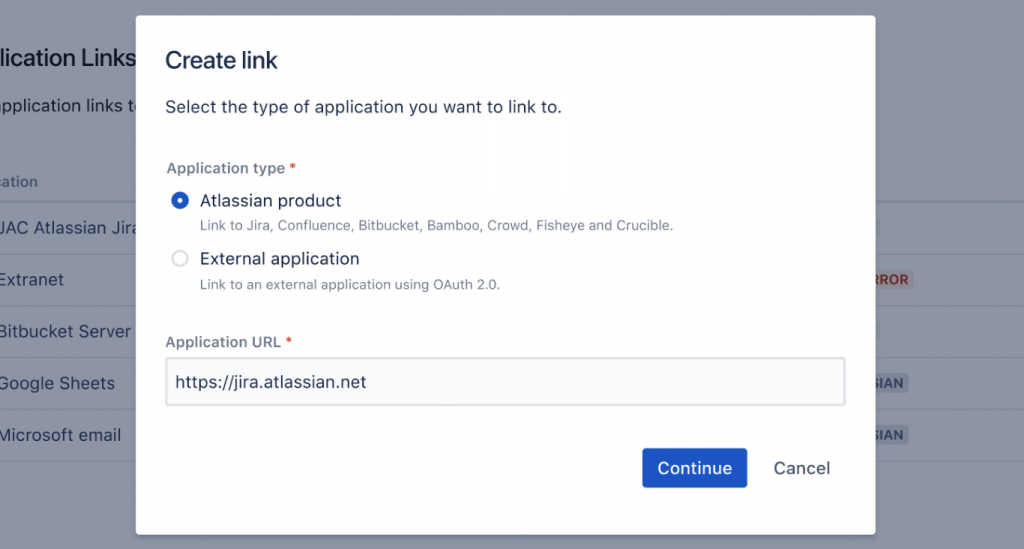
Beware, with the latest versions of Jira Data Center, OAuth 1.0 does not appear listed when creating a new application link in Jira. However, as explained the Jira DC documentation, select Atlassian Product to create an app link for iObeya using OAuth 1.0.

AdministrationJira

Resolving SSO Error: "The end instant must be greater or equal to the start"

Performance issues can have a major impact on the user experience, for example:

  • Slowness in logging on or accessing the application, a room or a board
  • Slowness in saving and taking into account modifications made by users
  • Failure to save certain user modifications
  • Total unavailability of the application
  • ...

There are two main causes of performance or slowness problems:

  1. Incorrect sizing of the platform in relation to its intended use
  2. Problems with communication and data transmission between user workstations and the server.

In any case, we will get back to you quickly to provide a workaround when possible.

First level of analysis on your side

We invite you to check the following points:

  • Dimensioning:
    • Check that your server's prerequisites are in line with your server's usage during peak periods.
    • Check your server's advanced configurations, particularly with regard to memory allocation and the various configuration parameters, especially with the database.
    • Check your monitoring data, which may indicate platform undersizing (CPU, RAM, etc.).
    • If you see discrepancies with our recommendations, we invite you to upgrade your platform to match the minimum technical requirements linked to your use of your iObeya platform.
  • Network :
    • If you can access the server directly, check whether these slowdown problems occur by accessing the application from the server itself (localhost). This will validate or invalidate the hypothesis of a network problem.
    • If the problems don't occur from the local host, it's a network-specific problem. In this case, check with your network technical teams to see if there are any network assets that could be causing slowdowns or bottlenecks.

Second level of analysis on the Support side:

Following the first analysis, and if you haven't identified any discrepancies between the recommendations and your server, please send us the following information to support@iobeya.com:

  • The context (including days and times) in which you are experiencing these slowdowns or performance problems. It's important for us to know whether you're experiencing these problems all the time or at a certain time of day.
  • Your feedback following the first analysis.
    Tomcat logs (available on the server in the Tomcat log folder)
  • In iObeya administration :
    • Application logs, in the “Tools/Download logs” menu
    • Your server's system information, in “Tools/System information” (the button is at the bottom of the page)
    • Monitoring information for this week/month in “Tools/Monitoring”, which you can print out as a PDF file.
    • Record a trace using your browser to help diagnose the problem by reproducing the slowness that was reported.
    • If you have your own monitoring system, or if you have activated JMX iObeya, you can also send us the results.

Once we've received all these elements, the support team will analyze the first elements provided and check whether there are any apparent reasons for the slowness.

Third level of analysis:

If there's nothing explicit or apparent on the face of the elements, or if the problem requires support in auditing and implementation, you'll be redirected to our technical consulting service for a more precise audit within a commercial framework.


The iObeya Support Team

AdministrationApplicationDebugQCDSetup and maintenance

I think I found a bug in iObeya, can you help me?

The iObeya Support Team will do its best to find a solution. So we need as much information as possible to be as efficient as possible and make basic, initial checks:

  • If an error message occurs, copy it (in text format)
  • Take a screenshot of your entire iObeya page. Make as much readable as possible
  • The context is important:
    • If you remember, explain to us the different steps you went through before encountering the issue.
    • If a screenshot/video is relevant, send it. Please note that a global view is the best, not just a focus of the situation.

If possible, ask your iObeya platform administrator to:

  • Download the logs from the menu "Tools/Download logs" in the administration, send them by telling us approximately the date & hour the issue happened.
  • Download the system information of your server from the menu "Tools/System information" in the administration (the button is at the bottom of the page).


Finally contact the iObeya Support Team to provide the collected information and we will help you.

AdministrationApplicationDebugJiraQCDSetup and maintenance

Resolving SSO Error: "The end instant must be greater or equal to the start"

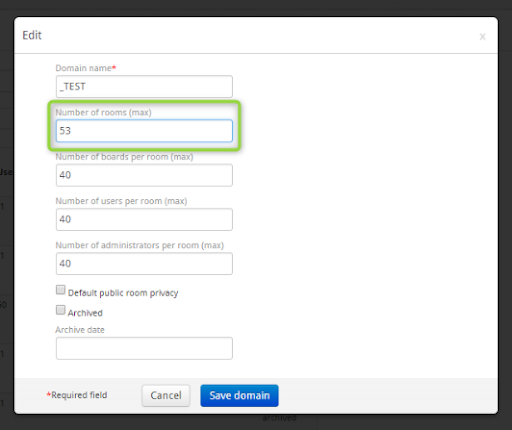
After installing a licence with additional rooms, to avoid such issues, first increase the max number of rooms of the domain in which you want to create a room.

Reminder: you must have the “Manage Domain” permissions.

If this does not solve your issue, please contact the iObeya Support Team for assistance.

Administration

Resolving SSO Error: "The end instant must be greater or equal to the start"

If your iObeya server url is http://myiobeyaserver to access the administration, just add : /admin at the end: http://myiobeyaserver/admin

e.g. http://YOUR_IOBEYA_URL => http://YOUR_IOBEYA_URL/admin

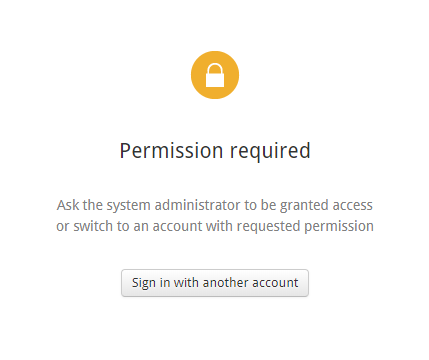
You may access the administration interface, but encounter this message:

It means you need to ask an administrator to grant you access, or that your company does not want you to access to this interface.

Administration

Resolving SSO Error: "The end instant must be greater or equal to the start"

Here are some recommendations regarding Users/Group management. We actually manage our customers’ cloud platforms in this way:

For each domain, create a “domain-user” group and give the following permissions:

  • Can use
  • (Optionally) Publish as template


When you want to add a user set to a room:

  • case n°1 Local group => make a Bulk user import by selecting the group (which has the permissions for the domain). Just copy and paste the users in the CSV file and select the group.
  • case n°2 Entreprise directory group: add users to this group, let iObeya synchronize (or do it manually).
    In both cases, users are all added to the group, so have the “Can use” permission on the domain. The room administrator can therefore find them by searching from the room and adding them.

Limit: All room administrators have the ability to add users to their room.

Administration